
WooCommerce is one of the most widely used eCommerce solutions for building online stores. It allows businesses to sell products, manage orders, track inventory, and accept payments easily. However, since WooCommerce pages handle important customer information such as login details, order history, and payment data, they must be properly protected.
If these pages are not secured, hackers, spam bots, or unauthorized users may try to access sensitive information. This can lead to data theft, fake orders, or website damage. Therefore, protecting WooCommerce pages is an essential step for maintaining a safe and trustworthy online store.
This blog explains simple and effective methods to secure WooCommerce pages, so your website and customer data remain protected.
Contents
- 1
- 2 Why Protecting WooCommerce Pages Is Important
- 3 Key WooCommerce Pages That Need Protection
- 3.1 1. Strengthen User Authentication
- 3.2 2.Enable SSL Security
- 3.3 3.Install Security Plugins
- 3.4 4.Restrict Access to Sensitive Pages
- 3.5 5. Prevent Spam Registrations and Bots
- 3.6 Security Practices in Modern Website Development
- 3.7 6. Keep WordPress, Themes, and Plugins Updated
- 3.8 7. Manage User Roles and Permissions
- 3.9 8. Create Regular Website Backups
- 3.10 Quick Checklist for WooCommerce Security
- 3.11 Conclusion
Why Protecting WooCommerce Pages Is Important
WooCommerce pages handle many important activities in an online store. These pages often contain customer information and transaction details, which makes them attractive targets for hackers.
Without proper protection, several problems may occur:
- Unauthorized access to customer accounts
- Spam registrations or fake users
- Fraudulent orders
- Malware attacks
- Loss of customer trust
- Website downtime
By securing WooCommerce pages, website owners can prevent many of these risks and ensure that customers can shop safely.
Key WooCommerce Pages That Need Protection
Certain WooCommerce pages handle sensitive data and must be secured carefully.
| WooCommerce Page | Purpose | Security Importance |
| My Account Page | Allows customers to view and manage their accounts | Contains personal and order information |
| Checkout Page | Processes payments and order confirmation | Handles billing and payment data |
| Cart Page | Displays products before purchase | Prevents bot activity or spam |
| Login Page | Allows customers to access their accounts | Protects user credentials |
| Order Details Page | Shows purchase information | Protects transaction data |
These pages are critical for the functioning of an eCommerce store and require strong security measures.
1. Strengthen User Authentication
One of the first steps to protect WooCommerce pages is improving the login security of your website.
Important practices include:
- Using strong passwords for user accounts
- Enabling Two-Factor Authentication (2FA)
- Limiting login attempts
- Adding email verification for registrations
These methods help prevent hackers from gaining access through weak login credentials.
2.Enable SSL Security
An SSL certificate encrypts the communication between the user’s browser and the website server. This is especially important for WooCommerce websites because they process payments and personal information.
Advantages of SSL
- Protects sensitive customer data
- Prevents hackers from intercepting information
- Improves website credibility
- Helps improve search engine rankings
Websites with SSL will display https instead of http, showing that the connection is secure.
3.Install Security Plugins
Security plugins provide additional protection for WordPress websites and WooCommerce stores.
These plugins can automatically monitor your website and block suspicious activities.
| Security Feature | Purpose |
| Web Application Firewall | Blocks harmful traffic |
| Malware Scanner | Detects malicious files |
| Login Security | Prevents brute-force login attacks |
| Activity Monitoring | Tracks suspicious user actions |
Using a reliable security plugin makes it easier to maintain the safety of your online store.
4.Restrict Access to Sensitive Pages
Some WooCommerce pages should only be accessible to logged-in users.
For example:
- My Account page
- Order history pages
- Downloadable product pages
Restricting access ensures that only authorized users can view their own account details.
This can be done by:
- Enabling login-required page settings
- Using membership or access control plugins
- Setting proper user permissions
These steps help prevent unauthorized visitors from viewing private data.
5. Prevent Spam Registrations and Bots
Many WooCommerce websites face issues with spam registrations and automated bots.
To prevent this problem, you can implement the following solutions:
- Add Google reCAPTCHA to login and registration forms
- Enable email verification for new accounts
- Use anti-spam plugins
- Disable automatic user registrations if not required
These measures help reduce fake accounts and protect your website from spam activity.
Security Practices in Modern Website Development
Security plays a major role in building a successful eCommerce website. When developers design an online store, they must ensure that sensitive pages are protected and customer data is handled securely.
For businesses investing in WordPress Website Development, implementing proper WooCommerce security measures is essential. A well-developed website includes features such as secure login systems, protected checkout pages, firewall protection, and regular security monitoring. These practices help businesses maintain a safe online shopping environment and protect both customers and website owners.
6. Keep WordPress, Themes, and Plugins Updated
Outdated software is one of the main causes of security vulnerabilities in WordPress websites.
Regular updates help:
- Fix security issues
- Improve performance
- Add new features
| Website Component | Importance of Updates |
| WordPress Core | Protects against security vulnerabilities |
| Themes | Ensures compatibility and safety |
| Plugins | Fixes bugs and improves security |
Always update your website components regularly to maintain strong protection.
7. Manage User Roles and Permissions
Proper user role management is another important step in WooCommerce security.
Different users should have different levels of access.
| User Role | Access Level |
| Administrator | Full website control |
| Shop Manager | Manages products and orders |
| Customer | Can purchase and manage account |
| Subscriber | Limited access |
By assigning correct permissions, you reduce the chances of unauthorized changes or data access.
8. Create Regular Website Backups
Even with strong security systems, unexpected issues can still happen. Regular backups help you restore your website quickly if something goes wrong.
Benefits of Regular Backups
- Prevent permanent data loss
- Restore the website after hacking attempts
- Reduce downtime
Backups can be stored in:
- Cloud storage services
- External backup servers
- Backup plugins
For WooCommerce websites, daily or weekly backups are highly recommended.
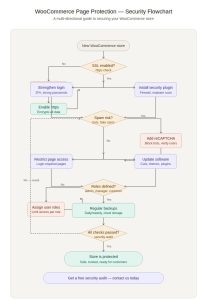
Quick Checklist for WooCommerce Security
Here is a simple checklist you can follow to protect WooCommerce pages:
- Enable an SSL certificate
- Use strong passwords and authentication methods
- Install a reliable security plugin
- Protect login and registration pages
- Add reCAPTCHA to prevent bots
- Update WordPress, themes, and plugins regularly
- Restrict access to sensitive pages
- Perform regular website backups
Following this checklist can greatly improve the security of your WooCommerce store.
Conclusion
Protecting WooCommerce pages is a crucial part of running a safe online store. Since these pages manage customer accounts, order details, and payment information, proper security measures must be implemented.
By using SSL encryption, strong authentication, security plugins, and regular updates, website owners can reduce many common security risks. Preventing spam registrations, controlling user access, and maintaining regular backups also contribute to better website protection.
A secure WooCommerce store helps build customer trust, protects business data, and ensures smooth online shopping experiences. Implementing the right security practices will help keep your eCommerce website safe and reliable.
Contact Our Development Team Today: At +91 844 844 0112 or reach out via email at hello@netstager.com.