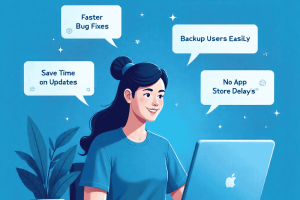

Being a Flutter developer, making sure that the apps are up to date and consistent is one of the biggest challenges that a developer can encounter. Mobile apps often go through frequent changes—whether it’s bug fixes, UI improvements, or new feature rollouts. A lot of users do not update on time, app stores introduce delays in review and approval, and developers have a lot of problems supporting various versions of the same application.
It also gives developers the ability to create over-the-air (OTA) updates that can be transferred directly to user devices without app store approvals, which provides a smooth and stable experience to developers and end-users.
The Flutter Updates Dilemma

Flutter apps can be updated in some cases, which is time-consuming. Not every user will install an update even after it has been issued. This brings about disaggregation because some of them are stuck with an older version, and others are on the latest version, so it becomes difficult to support them with the same consistency.
Contents
Why Users Delay App Updates
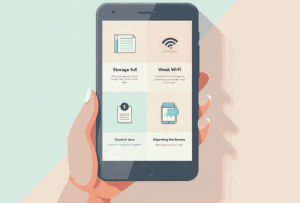 Users delay updating their apps because of a number of reasons:
- There is not much storage available on their device.
- Internet connectivity is low, or data is limited.
- No knowledge of new features or fixes.
- Do not want to switch the apps they are using.
The result? A considerable number of users are left to be attached to the old versions, which impacts their performance of the apps and their satisfaction in a negative way.
Dangers of Older Version Apps
 The fact that the users are allowed to use the old versions can cause severe problems:
- Risk of crashes and bugs increased.
- Unpatented code security vulnerabilities.
- Unstable apps among users.
- Longer development cycles, as the developers will have to maintain multiple versions.
To developers, it is a nightmare when it comes to maintenance, which consumes time and resources.
What Do Silent Updates in Flutter Entail?
Silent updates enable the mobile app developer to update apps in the background without having to force the user to download updates manually. The user experience is not compromised, and the app silently upgrades to the most current improvements.
How Silent Updates Work
 Using Shorebird Silent Updates, the developers update the Shorebird server. These updates are automatically downloaded and installed on the devices of users as the app is used, and no user action is necessary.
The outcome is straightforward: the users are always ready to use the latest version without having to open the app store.
Benefits for Developers and Users
For developers:
- Bug fixes immediately – No coincidence in the store.
- Reduced size updates – Patching only is used, not complete builds.
- Version control – Release updates to a small number or to selected users.
- Decreased maintenance – Not so much time was devoted to the work with fragmented versions.
For users:
- Continuous experience – Changes are made in the background.
- Increased stability of apps -Reduced crashes and glitches.
- Better security – 24/7 vulnerability fix.
- Smooth implementation of new features.
Why I Choose Shorebird
 Code Push Solution
In comparison to the old updates, Shorebird is a full-fledged code push service of Flutter applications. It allows me to manage the update cycle, end-to-end, without me being dependent upon app store approval cycles.
Key Features That Simplify App Updates
- Simple Flutter integration, Simple setup, and documentation.
- Store-independent OTA updates- It is not a part of the app store release process.
- Dart patching: Push patches rather than complete builds.
- Version management: See gradual or selective rollout.
- Analytics and monitoring – Monitor success and adoption of updates.
- All this makes Shorebird a necessity to a developer who appreciates speed, flexibility, and user satisfaction.
How Shorebird Silent Updates Work
OTA Updates Made Simple
Shorebird automates the process. When changes are pushed to Shorebird, it is sent directly to the devices of users.
Patches vs Full Releases
- Patches – Can be used to do minor corrections or modifications to Dart code. They are light, quick and do not need full approval in the app store.
- Full Releases – Needed in case of native code, dependency, or new assets changes. Shorebird simplifies this, but the app store submission is necessary.
Learn more about when to issue patches vs full releases with Shorebird CLI
This balance allows developers to deal with the majority of updates without disturbances and fully release with major changes.
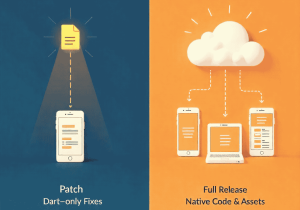 Patch for Dart-only Fixes